Manage data
Your robot’s sensors, cameras, and other components produce data you need to record, analyze, and act on. Viam’s data management service lets you configure which components to capture from, sync captured data to the cloud, and query, export, or use it for ML training without building a custom data pipeline.
How data flows
Data moves through four stages, from your robot to actionable insights:
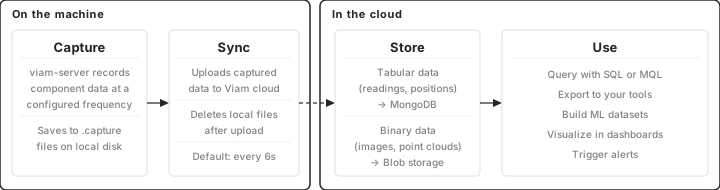
- Capture on the machine. You configure which components to record from and at what frequency. Captured data is written to local disk. Data capture is off until you configure it, either on a component or through a capture control sensor.
- Sync to the cloud. A separate process uploads captured data to Viam’s cloud at a configurable interval, then deletes local files. If the machine goes offline, data buffers locally and syncs when connectivity returns.
- Store. In the cloud, tabular data (sensor readings, motor positions, encoder ticks) is stored in MongoDB. Binary data (images, point clouds, audio) is stored in blob storage. Both are indexed and queryable.
- Use. From the cloud, you can query data with SQL or MQL, export it to your own database, build datasets for ML training, create monitoring dashboards, or trigger alerts when data meets a condition.
Capture and sync run independently: you can capture without syncing, or sync files from other sources without using Viam’s capture.
To get started recording data, see Capture and sync data. To try the whole flow end to end with a simulated sensor, follow the Capture and query tutorial.
Query and explore
All captured tabular data is queryable through SQL and MQL, either in the Viam app’s query editor or programmatically through the SDK. You can run ad-hoc queries for data exploration, create custom indexes to speed up frequent queries, and save MQL queries for reuse. The Query Assistant (Beta) helps you write SQL and MQL queries from a plain-language description.
Binary data (images, point clouds) is browsable and filterable in the Viam app’s Data tab, with viewers for images, video, and 3D point clouds.
See Query data and Query reference.
Transform and pipeline
Data pipelines run scheduled MQL aggregations on your captured data. Use them to compute hourly averages, detect trends, or reshape data for downstream tools. Pipelines run on a cron schedule with optional backfill for historical data.
A hot data store keeps a rolling window of recent data in a fast-query database, so you can build real-time dashboards without scanning the full archive.
See Create a data pipeline and Hot data store.
Export and integrate
Viam is not a data silo. You can export data to your own tools and databases:
- CLI export: download binary or tabular data in bulk.
- SDK access: query and download data programmatically from Python or Go.
- Direct MongoDB connection: connect Grafana, Tableau, or custom scripts directly to your data through a MongoDB connection URI.
See Export data and Sync to your database.
Delete data
Delete captured data on demand through the Viam app, the CLI, or the SDK, or set retention policies to auto-delete data after a configured number of days.
The SQL and MQL query editor is read-only: you cannot delete data through it.
See Delete data and Platform-managed capture settings.
Annotate and train
Captured images can be tagged, annotated with bounding boxes, and organized into datasets for ML training. To keep the images and readings from one event together, record them as a sequence and collect sequences into a sequence dataset. Viam provides a complete path from captured data to a deployed model:
- Capture images from your robot’s cameras.
- Label them with tags and bounding boxes in the Viam app.
- Organize labeled images into a dataset.
- Submit a training job (Vertex AI AutoML or your own training container).
- Deploy the trained model back to your robot.
See Tag data, Sequences, Create a dataset, and the training section for details.
Visualize and alert
Triggers send webhooks, email alerts, or push notifications when synced data meets a condition, so you can respond to events like temperature spikes or detection results without polling.
Build monitoring views with data dashboards and Teleop workspaces in the Viam app, or connect Grafana and other tools to your data through MongoDB.
See Trigger on data events and Visualize data.
Manage data volume
Robots can generate more data than your network can transfer or your budget can store. Viam provides several tools to control data volume:
- Capture less: lower the capture frequency, use a filtered camera or custom filter module to keep only data that matters, or capture on demand only during specific moments.
- Sync selectively: with conditional sync, a sensor on the machine decides whether to sync or hold data.
- Retention policies: configure how long data is retained in the cloud. See Platform-managed capture settings.
See the Capture and sync overview to choose among them.
Security and data integrity
Data is encrypted in transit using gRPC and encrypted at rest by the cloud storage provider.
The sync process is designed to prevent data loss and duplication:
- If the connection drops, the service retries at exponentially increasing intervals until restored.
- Sync resumes where it left off without duplicating data.
- Files still being written are not synced until they stabilize (configurable, default 10 seconds).
Was this page helpful?
Glad to hear it! If you have any other feedback please let us know:
We're sorry about that. To help us improve, please tell us what we can do better:
Thank you!